
Pocket Money App for Kids
Pocket Cub is a pocket money app that helps parents teach children how to earn, save and spend money through everyday experiences.
- For ages roughly 5 to 14
- No card, no bank link, no fees
- Any currency, including ₹
What is a pocket money app?
A pocket money app helps parents give, keep track of and talk about the money their children get. Instead of coins that disappear and amounts nobody remembers, there’s one place where your child can see what came in, what they spent and what they kept.
Pocket money apps come in two kinds, and it’s worth knowing which one you want.
A prepaid card for your child
Some apps give your child a debit or prepaid card loaded with real money. They’re handy for paying in shops, but they need a bank-style account, ID checks and often a monthly fee.
A shared record of the money you already give
Pocket Cub never touches real money. You give pocket money the way you do now, and the app keeps the record and turns it into lessons. No card, no bank link, nothing to sign your child up for.
How Pocket Cub approaches it
You keep all the reins
The real money stays with you. You decide the allowance, the chores, the rewards and the interest rate, and Pocket Cub keeps everyone’s numbers straight.
Learning by doing
Children don’t learn money from a talk. They learn by earning a little, spending some, keeping some, and watching their own numbers change.
Start early
By about age seven, children have usually formed the basic ideas behind their later money habits (University of Cambridge, 2013). Small amounts now are the cheapest lessons they’ll ever get.
What Pocket Cub actually does
Everything below is in the app today.
 Keeping records
Pocket money on autopilot
Set a weekly or monthly allowance once. It’s added on its own, and every amount in and out is written down.
 Earning
Chores that pay
Add chores with a reward: one-off, daily or weekly. When your child ticks one off, the reward lands in their balance. Optional reminders nudge them at a time you choose.
 Smart spending
Spends they log themselves
When your child buys something, they log it and see their balance before and after. Made a mistake? They can undo it straight away.
 Saving & interest
Savings that earn interest
Let their balance earn interest monthly, weekly or every few days, or lock money away for a set number of days at a rate you choose. It comes back with interest on top.
 Ownership
Kid Mode
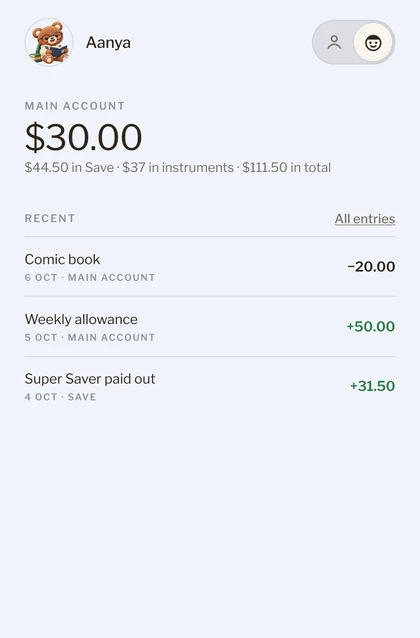
Hand over your phone and your child sees only their own money and chores, in their own colour. Getting back to your side needs your passcode.
 For the whole family
Every child, one screen
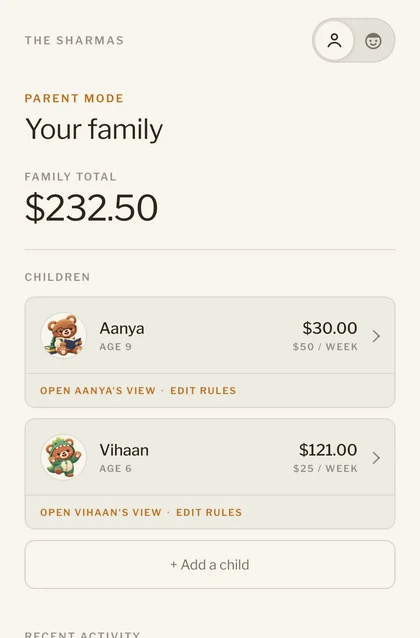
Add as many children as you like, each with their own balance, allowance and chores. You see the family total at a glance, in any currency.
Pocket Cub is free, with no card and no fees. It’s on Android now; the iPhone app is on its way. See it step by step on How it works.
What age is a pocket money app for?
Pocket Cub works best for children roughly 5 to 14. What you set up changes as they grow.
First steps
A small weekly allowance and one or two simple chores. They learn that money comes in, goes out, and can be kept.
Making it last
They log their own spends and make a weekly allowance last. A short savings lock shows interest arriving within weeks.
Planning ahead
A monthly allowance to plan around, longer savings locks, and comparing what different rates and lengths earn.
Parental controls
Pocket Cub has two modes on one phone. You set the rules in Parent Mode; your child uses Kid Mode.
You can
- Set allowances, interest rates and rules
- Create savings and put money into them
- Add chores and their rewards
- See the family total, each balance and recent activity
- Manage children, your passcode and your account
Your child can
- See their balance, entries and savings
- Log their own spends
- Tick off their own chores and get the reward
Your child can’t
- Change any rules
- Move money into savings
- Reach your screens without your 4-digit passcode, even after the app is closed and opened again
Your child doesn’t need an account, an email address or their own phone. Your family’s data is private to you, and you can delete your account at any time. More on Safety and Kid Mode.
Pocket Cub vs a traditional cash allowance
Pocket Cub doesn’t replace the pocket money you give. It adds the record, and the lessons that come from seeing it.
| Compared | Cash allowance | Pocket Cub |
|---|---|---|
| Keeping track | From memory, or not at all | Every amount in and out is written down, with a clear history |
| Payday | Easy to forget, or to argue about | The allowance is added on its own, every week or month |
| Chores | Paid when someone remembers | Each chore has a reward that lands as soon as it’s ticked off |
| Spending | Spent, and soon forgotten | Your child logs it and sees their balance before and after |
| Saving | A jar or a piggy bank | Savings that earn interest at a rate you choose |
| The real money | Changes hands | Still changes hands your way, in cash or by UPI. Pocket Cub keeps the record |
| Cost | Free | Free. No card, no fees |
Questions parents ask
Does Pocket Cub move real money?
No. Pocket Cub is a shared record between you and your child. You give pocket money the way you do now, in cash or by UPI or bank transfer, and the app keeps track of it.
Is Pocket Cub free?
Yes. Every feature is free to use. There’s no card and no fees.
What age is Pocket Cub for?
Roughly 5 to 14. Younger children start with an allowance and a simple chore; older ones log their own spending and try savings that earn interest.
Does my child need their own phone or a bank account?
No. Kid Mode runs on your phone, and your 4-digit passcode keeps Parent Mode locked. Your child doesn’t need a phone, an email address or a bank account.
Can I use it in rupees?
Yes. You pick your family’s currency when you set up: rupees, dollars, pounds, euros or any other.
Can I add more than one child?
Yes. Add as many as you like. Each child has their own balance, allowance and chores, in their own colour, and you see the whole family on one screen.
Which phones does it work on?
Android phones, from Google Play. The iPhone app is on its way.
More answers on Questions.